Powered by Blog - Widget


Showing posts with label Thingamajigs. Show all posts

Tuesday, October 22, 2013

My iPhone was Stolen!

In the middle of a busy run-up to Noey's birthday, something catastrophic happened: I lost my mobile phone.

For someone for whom the mobile phone is virtually an extension of an arm -- yes, guilty as charged -- to say that I was totally lost and disoriented is an understatement. And let's not forget ANGRY.

What happened was this: On Friday morning a couple of week a go, I brought Meips for class at Safra Toa Payoh, as I usually do. I had my phone in my pocket to snap pics of her during class. After class, I took my phone out to check the time and saw that it was 10.51am. I must have put my phone back in my pocket though it was a subconscious act so I don't remember exactly. I got our things, got Meips ready, walked out the door, picked her up, and carried her down the stairs to the Toast Box on the ground floor. After ordering, I started rummaging around for my phone as I wanted to give my helper a ring with instructions on cooking lunch. That was when I realised that MY PHONE WAS GONE.

I hastily paid up, got Meips and re-traced my steps back to Gymnademics, but found nothing. When I was at the gym, her teacher helpfully lent me his phone so that I could give myself a buzz to locate my phone. I tried but my call was directed straight to voicemail. My phone was off. My heart sank. Repeated tries yielded the same result. 

I knew then -- in the short span of 8 minutes, some horrible, nasty, dishonest person had decided to keep my phone for himself.

I went downstairs to the security desk to leave my name, in the vain hope that my phone would be returned. I then had to leave to pick Noey from school after which I spent some time fruitlessly trying to use Find My iPhone to locate my mobile. I later also returned to Safra Toa Payoh to ask to check the CCTV to see if I could figure out what had happened, but was informed that there were protocols for that, and that only the police would be able to view the tape after I make a police report. Sigh.

Anyway, I'm just glad that I'm obsessive about transferring photos from my phone to my computer every few days. As such, I only lost about 2 days of pics. I would have been devastated if it had been more! And because I just did an upgrade to iOS7, my phone backup was only about a week old. I had a newer backup, but tragically iOS7 cannot run on the 3GS. Yes, it's too old!

I'm now waiting for the 5S to be in stock before I do an upgrade. With the 3GS and stolen 4S, it looks like I'm continuing my trend of owning "S" series phones. 

Anyway, through this traumatic process, I learnt some lessons about what you can do if your phone is lost or stolen. While I hope this never happens to anyone, here are some tips in the event that it does.

1. Backup, backup, backup.

Obviously this is something you ought to be doing before anything untoward happens to your phone. I had the bad experience once of having my phone malfunction and have to be replaced. At that time, I didn't backup regularly, and therefore lost a whole chunk of data. It was very painful. I now backup my phone on my computer at least every week or so, and faithfully transfer all my photos out to iPhoto every couple of days. Just sync with iTunes and a full backup will be stored on your computer. This will include your most important information -- contacts, calendar entries, SMS and Whatsapp messages, photos and videos, and app information. Whew. I seldom delete messages and I remember the old days when the info couldn't not be transferred from phone to phone, when I used to agonise over having to delete them all before upgrading and trading in my phone. I even have a word doc where I typed out the messages I wanted to keep! Thankfully I wouldn't have to do that anymore these days.

Here's a useful link from Apple Support:  How to Backup and Restore your iPhone.

2. Activate iCloud and Find my iPhone.

The alternative to backing up on the computer (which might also fail!) is to backup on iCloud. I didn't do this mainly because I have way too much data on my phone - primarily photos - and each person only gets 5GB free storage. Obviously insufficient for my gazillion photos. But if you: (1) don't have over 6,000 photos and videos on your phone like me, or (2) are willing to pay for additional iCloud storage, this is a good option. Better than a manual backup in fact, as iCloud will automatically backup every time you are connected to wifi. That's very convenient as you can then rely on the phone to do the backing up for you.

Even if you don't use iCloud for backup, you should still turn it on together with Find my iPhone. This app is specifically designed to help you locate a missing iDevice with another. With the latest version, you can remotely lock your screen, display a message with a contact number, lock your phone with an activation lock so that it would be more difficult for someone else to use your phone, and even remotely erase your info. I thought I did this correctly on my phone, but I don't know, since I'm not getting any data. Definitely something I'm going to make sure I do right only new phone!

More information on this here: Find My iPhone, iPad and Mac.

3. Keep a record of your phone's IMEI number. Or keep your iPhone box.

We've probably all heard of the IMEI number -- the unique serial number of each and every mobile. Knowing this number is useful as you can block the phone from being used in the country. Take that, thief! I've given the IMEI number of my phone to the police. You can also inform your mobile carrier so they can put it on a blacklist.

More information at this link: What's the Importance of the IMEI Number.

Something I've learnt: the IMEI number of an iPhone is on the barcode on the box. So it's good news if you're a box hoarder like me. 

4. Make a Police Report Online

I eventually made a police report about my lost, or rather, stolen phone, primarily because the security at Safra Toa Payoh had indicated that only the police would be allowed to view the CCTV after a report was made. Unfortunately I couldn't find the time to do it quickly and only managed to make the report a few days later. On hindsight, I realise I should have made it immediately to up my chances of actually nabbing the thief. Also, perhaps with a report in hand, I might have been able to convince the security to let me have a look at the CCTV. It was only while sitting in the police station looking at the posters around me that I realised you can actually make a police report online. If I had known that, I could have gotten around to it way more quickly. Possibly even on the same day. So now I'm telling you.

It's all been a learning experience for me. I'm not sure what's happening with my police case, though I'm not expecting much. I would just like to know what happened to my phone. Anyway, we'll see how it goes. In the meantime, I'm holding out for a new phone, something made harder by the fact that the screen of my 3GS recently conked out and now has no backlight! So I have to squint at it in bright daylight to see it. The price I'm paying for being careless. New stock of the 5S, please come quickly!

Monday, June 24, 2013

We Love Zoku-ing Hot Days Away!

Hot muggy days are popsicle days!

Zoku1

I bought a Zoku Quick Pop-Maker from mommygrabs.com during a flash sale about 2 months ago, and since then we've been enjoying lots of ice lollies on hot days. Another mummy friend told me that ice lollies have been a great way to get kids to take in more fluids during these hot and hazy days, and I must agree! These go down in no time! 

The best thing about the Zoku is that the pops are made in minutes. You do have to freeze the pop-maker overnight first, but I just leave mine in the freezer so that we have it ready when we want it. To make a lolly, you just stick the sticks in the slots, pour in your desired liquid, and wait 7-10 mins. I sometimes just pop the maker back into the freezer while waiting so that it'll be even faster. You know, there's nothing like almost instant lollies when you have impatient kids on your back!

And when the lollies are done, you just have to use a Super Tool (yes, they actually call it that) to ease them out of the their molds easily. I don't know how it works, but there really is no tugging required. Just screw on the Super Tool (ahem) to the top of the stick, and after some twisting, it would suddenly get loose and you can pull the ice lolly right out. Awesome. 

I also like that because it freezes so quickly, you are able to make layers, or even a lolly with one flavour as a shell and another on the inside. Just like those orange ice lollies with milk inside that I used to love as a child. (Their name escapes me!) I've not tried this but it is on the cards.

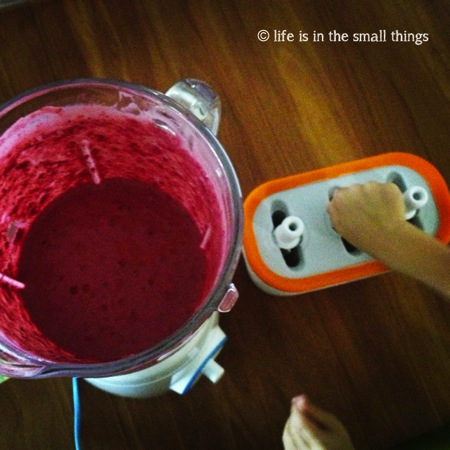
I recently wanted a thick, creamier popsicle, so out came my new Jamie Oliver blender and together they made a real winner.

Zoku2

I've had friends ask me about the recipe, but I honestly just threw in what I had in the fridge, and in my usual fashion, I didn't take note of the measurements. But if you're interested to try this, it comprises frozen strawberries and blackberries, milk, a bit of plain yoghurt and some Frosty Whip, which is a sweetened whipping cream powder. It was really yummy. So yummy that my terrible children climbed on the table to steal some from the blender jug when I walked to the kitchen to pop the Zoku back into the freezer.

Zoku3

And when the pops were done, Noey practically inhaled his, while Meips, well, let's just say she had fun with it.

Zoku4

Definitely a worthwhile investment! I've bought a couple more from Takashimaya as presents for friends, but I'm pretty sure you can get the Zoku at most major department stores. It definitely makes hot days more bearable!


Wednesday, June 06, 2012

Macbook-ed

It was my birthday last Thursday on the last day of May.

I will leave the usual reflective birthday post for another day. (Or not, if I never get round to it.) This post is about my present. This year, I decided to go geek and asked D for a new laptop -- my first EVER Mac.


Hello, Macbook Pro!

This was the laptop that I nearly got the last time, but which I decided against because it was too expensive. That was before I got my iPhone. The phone was my first Apple product, and given that I love it so much that it is practically glued to my hand, when my laptop started acting up, I decided that this time, I was going to get the Mac. I was going to switch and never look back -- just the way all my fervent Mac-loving friends have told me. "Mac systems are intuitive, aren't they?" I told myself. "How hard can it be to switch?"

Well.

For this girl who has been using PCs and Windows all her life, it's been a painful few days, as I tear my hair out trying to figure out what to click, how to click and where in the world all my stuff is. To be fair, part of the pain stems from the usual difficulties which come with using a new machine and having to re-install programmes, shortcuts and re-input saved passwords and favourites. I somehow also thought iTunes connectivity with my iPhone would be more seamless. Just sync and everything will be transferred over, right? The answer, unfortunately, appears to be NO. (Unless I'm missing something. In which case PLEASE tell me.)

The good news is that every "how-to" that you want to ask about using a Mac appears to have been asked and answered. Alternating between Help and Google, I've managed to figure out how to install my printer, how to preview a link in Safari, how to open a new tab in Safari, how to resize photos in iPhoto, how to copy all my music from my phone into iTunes on my new notebook.

At this point, I'm still getting up the courage to copy my music over. I've also given up on Safari and downloaded Google Chrome. Yay. Now I still have to figure out how to customize the items in the dock before I end up with a bazillion items in it, change my preferences and figure out why there are lights under a whole bunch of items in my dock. And someone please tell me how to minimize all the windows to show desktop?

Every time I turn up mournfully at the door asking for help for something, the husband will -- after having a good chuckle at my grief -- ask me if I want to download Windows. I just give him a dirty look.

Ah well, at least my new notebook looks gorgeous! (Which is, also a big part of the user experience for me.)

So, blogging here will be slow for a bit until I figure this Mac thing out.

Friday, June 17, 2011

Re-Kindling an Interest in Books

For my recent birthday, I decided to go tech.

(This is in part due to the fact that DD refuses to buy me bags as presents. Tsk tsk.)

Unable to decide between a Kindle and an iPad2, DD told me to get both. Hee.

My Kindle just arrived and I'm loving it. It is a specialist reading device and I can't get over the fact that the screen really looks like paper! I don't like reading off backlit screens and am one of those people who needs to print documents for reading at the office. That was the one major difficulty I had with moving to e-books so I'm glad there is no such problem with the Kindle. Of course, the downside is that it cannot be read in the dark. Still, I'm loving how light it is and the fact that I can read with one hand and without needing to wedge the book open. Perfect for reading while nursing!

It is making me re-discover my old books and get excited about new ones.

One of the reasons I got the Kindle is also because I foresee the iPad being more a family gadget. With the Kindle however, I think I have more of a chance of making it wholly mine. Now if only I can get Noey to get his grubby paws off it and get with the programme. I think I'll have a better shot once the iPad arrives!

He loves the screensavers, the image quality of which I think is amazing.

Friday, December 18, 2009

Noey x 4

I love the evening light. That golden light positively makes everything it falls upon radiate with life. And when it surrounds my little rambuctious boy, my little ball of energy, he positively glows.


DD decided to try to keep up his fitness regime (or make some attempt at it at least) so Noey and I accompanied him to the track nearby in the weekend and had a grand ol' time trying to chase Papa around, trying to spot buses zooming by on the adjacent road across the fence and trying to pull out the fake grass from the artificial turf within the track. (The latter activity being attempted by Noey only, not me!)

He moves so quickly these days, this little boy of mine. So I'm really loving the quadcam app that I downloaded just to catch him in action. It's snap snap snap and off he goes!


Every moment is a new adventure, for him, as it is for me too, when I am with him.


Tuesday, November 10, 2009

iPhone-d

Mama here has got herself a new toy.


And oh, how I love it.

It wasn't that there was anything wrong with my old phone. I honestly haven't even had it for that long (particularly when you consider the fact that I usually only ever change my phone when my contract is up). It was just that it, well, wasn't the iPhone. I'd previously wanted to get the iPhone but because I wanted to go Green, I ruled it out and opted for the HTC.

As it turned out, I loved having a smartphone, except that the one I had wasn't that smart after all. Or rather, I'm just not tech-savvy enough to go hunt down useful apps and make the phone work better for me. So in the end, I decided to do what I ould have done in the first place and get the iPhone.

I've had it for less than a week but I'm totally seeing why it's so popular -- apart from its sleek good looks, it's easy to use and everything just works together seamlessly. I love that you don't have to be a genius to use it.

And now as usually happens when I get something new, I've been spending alot of time messing around with it. My latest project has been to re-organise the music that DD had kindly imported me. I've been checking song titles, filling in the album details, hunting down album artwork... and I don't even like listening to music much! Hur hur. I am, however, rather OCD about stuff like that so I've been bent on getting it all sorted right. Let's hope I finish this soon cos I sure could do with more sleep!

Tuesday, May 26, 2009

In a nutshell

Surfacing after being buried in work to say: I'm so glad the board meetings are OVER! In my newly acquired role of company secretary, I'm all meeting-ed and minute-ed out.

After our Perth trip I've been bogged down with work, which was really very challenging to clear on a 2.5 day work week. In fact, in the process of trying to squeeze it all in, I worked late an extra night here and there these past couple weeks, resulting in me coming down with a headache for 3 days the previous weekend and culminating in a fever of 39°C on Monday. Guess it didn't help that it was freezing cold in the office while it was pouring outside. The doctor diagnosed a viral fever, but I personally thought it may have been a breast infection, cos OUCH. Anyway, fevers and offices are a no-go these days (even though I had no flu symptoms) so I was packed off home. Spent the afternoon sleeping away and on Tuesday, I went to my parents' place and handed Noey to them and took a good nap. By Wednesday I was right as rain but had even more work to catch up on. Such is life.

And this weekend just when I thought I might have some time to catch up on this blog, DD got me a new toy as an early birthday present.


It's sleek and gorgeous and NEW! Which means I've been spending a lot of time fiddling with it for no reason. Heh. Unfortunately changing to a new system means that I have to spend time copying and editing my contact list MANUALLY. Sigh. I'm at "C" and working my way through it!

So anyway, more (some what backdated) posts coming up. Stay tuned.

Monday, December 29, 2008

New Toy... for Mummy!


A new gadget for Christmas from the husband, that I love love love! (Both the husband and the new toy. You knew that right?)

My old lappy was starting to give me the blue screen of death more frequently so I decided it was time to get a replacement and do a quick transfer of my data before it died on me completely. I told DD to help me look for a replacement and the dear man obviously knows his wife cos when he came to discuss his shortlist with me, the first feature he highlighted was the colours they came in. Heh. He knew I would love the Vaio and he was right! Ah, I can be so superficial.

I reluctantly (and unexpectedly) passed up on the pink and went for this rich red cos I liked the interior black keyboard better than the metallic silver that came with the pink. And I'm loving it.

Now to get the software sorted so I can get back to my regular programming...

LinkWithin

Related Posts Plugin for WordPress, Blogger...