Powered by Blog - Widget


Showing posts with label Geeky. Show all posts

Tuesday, October 22, 2013

My iPhone was Stolen!

In the middle of a busy run-up to Noey's birthday, something catastrophic happened: I lost my mobile phone.

For someone for whom the mobile phone is virtually an extension of an arm -- yes, guilty as charged -- to say that I was totally lost and disoriented is an understatement. And let's not forget ANGRY.

What happened was this: On Friday morning a couple of week a go, I brought Meips for class at Safra Toa Payoh, as I usually do. I had my phone in my pocket to snap pics of her during class. After class, I took my phone out to check the time and saw that it was 10.51am. I must have put my phone back in my pocket though it was a subconscious act so I don't remember exactly. I got our things, got Meips ready, walked out the door, picked her up, and carried her down the stairs to the Toast Box on the ground floor. After ordering, I started rummaging around for my phone as I wanted to give my helper a ring with instructions on cooking lunch. That was when I realised that MY PHONE WAS GONE.

I hastily paid up, got Meips and re-traced my steps back to Gymnademics, but found nothing. When I was at the gym, her teacher helpfully lent me his phone so that I could give myself a buzz to locate my phone. I tried but my call was directed straight to voicemail. My phone was off. My heart sank. Repeated tries yielded the same result. 

I knew then -- in the short span of 8 minutes, some horrible, nasty, dishonest person had decided to keep my phone for himself.

I went downstairs to the security desk to leave my name, in the vain hope that my phone would be returned. I then had to leave to pick Noey from school after which I spent some time fruitlessly trying to use Find My iPhone to locate my mobile. I later also returned to Safra Toa Payoh to ask to check the CCTV to see if I could figure out what had happened, but was informed that there were protocols for that, and that only the police would be able to view the tape after I make a police report. Sigh.

Anyway, I'm just glad that I'm obsessive about transferring photos from my phone to my computer every few days. As such, I only lost about 2 days of pics. I would have been devastated if it had been more! And because I just did an upgrade to iOS7, my phone backup was only about a week old. I had a newer backup, but tragically iOS7 cannot run on the 3GS. Yes, it's too old!

I'm now waiting for the 5S to be in stock before I do an upgrade. With the 3GS and stolen 4S, it looks like I'm continuing my trend of owning "S" series phones. 

Anyway, through this traumatic process, I learnt some lessons about what you can do if your phone is lost or stolen. While I hope this never happens to anyone, here are some tips in the event that it does.

1. Backup, backup, backup.

Obviously this is something you ought to be doing before anything untoward happens to your phone. I had the bad experience once of having my phone malfunction and have to be replaced. At that time, I didn't backup regularly, and therefore lost a whole chunk of data. It was very painful. I now backup my phone on my computer at least every week or so, and faithfully transfer all my photos out to iPhoto every couple of days. Just sync with iTunes and a full backup will be stored on your computer. This will include your most important information -- contacts, calendar entries, SMS and Whatsapp messages, photos and videos, and app information. Whew. I seldom delete messages and I remember the old days when the info couldn't not be transferred from phone to phone, when I used to agonise over having to delete them all before upgrading and trading in my phone. I even have a word doc where I typed out the messages I wanted to keep! Thankfully I wouldn't have to do that anymore these days.

Here's a useful link from Apple Support:  How to Backup and Restore your iPhone.

2. Activate iCloud and Find my iPhone.

The alternative to backing up on the computer (which might also fail!) is to backup on iCloud. I didn't do this mainly because I have way too much data on my phone - primarily photos - and each person only gets 5GB free storage. Obviously insufficient for my gazillion photos. But if you: (1) don't have over 6,000 photos and videos on your phone like me, or (2) are willing to pay for additional iCloud storage, this is a good option. Better than a manual backup in fact, as iCloud will automatically backup every time you are connected to wifi. That's very convenient as you can then rely on the phone to do the backing up for you.

Even if you don't use iCloud for backup, you should still turn it on together with Find my iPhone. This app is specifically designed to help you locate a missing iDevice with another. With the latest version, you can remotely lock your screen, display a message with a contact number, lock your phone with an activation lock so that it would be more difficult for someone else to use your phone, and even remotely erase your info. I thought I did this correctly on my phone, but I don't know, since I'm not getting any data. Definitely something I'm going to make sure I do right only new phone!

More information on this here: Find My iPhone, iPad and Mac.

3. Keep a record of your phone's IMEI number. Or keep your iPhone box.

We've probably all heard of the IMEI number -- the unique serial number of each and every mobile. Knowing this number is useful as you can block the phone from being used in the country. Take that, thief! I've given the IMEI number of my phone to the police. You can also inform your mobile carrier so they can put it on a blacklist.

More information at this link: What's the Importance of the IMEI Number.

Something I've learnt: the IMEI number of an iPhone is on the barcode on the box. So it's good news if you're a box hoarder like me. 

4. Make a Police Report Online

I eventually made a police report about my lost, or rather, stolen phone, primarily because the security at Safra Toa Payoh had indicated that only the police would be allowed to view the CCTV after a report was made. Unfortunately I couldn't find the time to do it quickly and only managed to make the report a few days later. On hindsight, I realise I should have made it immediately to up my chances of actually nabbing the thief. Also, perhaps with a report in hand, I might have been able to convince the security to let me have a look at the CCTV. It was only while sitting in the police station looking at the posters around me that I realised you can actually make a police report online. If I had known that, I could have gotten around to it way more quickly. Possibly even on the same day. So now I'm telling you.

It's all been a learning experience for me. I'm not sure what's happening with my police case, though I'm not expecting much. I would just like to know what happened to my phone. Anyway, we'll see how it goes. In the meantime, I'm holding out for a new phone, something made harder by the fact that the screen of my 3GS recently conked out and now has no backlight! So I have to squint at it in bright daylight to see it. The price I'm paying for being careless. New stock of the 5S, please come quickly!

Monday, July 29, 2013

Blog Refresh

So I've been making some changes around these parts over the past couple of weeks.

If you popped by today, you would probably have noticed that the blog has gotten a new look. I got bored of my old template and decided that it was badly in need of an update. I got some help and that's what you're seeing here!


New-look.png

It still needs some work before I'm fully satisfied, but for now, I'm pretty pleased with it. It's certainly pinker, which in my book, is always a good thing. (Hah.)

And if you're really observant, you might have noticed that I've finally taken the plunge and got myself my own domain. This blog now can now be found at www.lifeisinthesmallthings.com. It's hard to believe, but I've been blogging in this space for more than 8 years now. When I first started, I never thought that this hobby of mine would be something that I would keep at for so long. Guess I just have too many things to say! I thought it was about time to have some virtual space to call my very own, so here it is.

One of the things that has definitely kept me going for so long has been the people that I've met online along the way. It also still surprises and touches me that so many of you come by regularly to read, comment and e-mail to share. It's been part of what has made this very rewarding for me.

I've been thinking more about having a schedule to ensure that I still manage to blog about all the different things that I love, because I only have that much time in a day to spend at the computer. To this end, I've created a poll which I would be grateful if you could help me with. Tell me: What is it that you've enjoyed reading on this blog? And what would you like to read more about? 

What would you like to read about on this blog?
  
pollcode.com free polls 
Do let me know what you think of the new look too. (Even if you hate it. Especially if you hate it, I think.) Thanks!   

Wednesday, October 31, 2012

We Are On Facebook!

FB Blog Page

After waffling to and fro on this, I've finally gotten round to setting up a Facebook Page for this blog.

Besides links to posts written on this blog, I hope to be able to share photos that give you snippets of what's going on in our daily lives, as well as share articles and interesting things that I read or come across that don't necessarily warrant a blog post. Given that I'm so behind on this blog anyway and have a million things sitting around in draft that intend to write about but never get round to doing, I think this might be a good way to keep the conversation going. (Conversation is quite the catchphrase these days huh!)

So I hope you'll hop on over and join me by "liking" our Facebook Page! I've also added the Facebook box to the sidebar on the left for easy access. I'll be seeing you there!

Thursday, July 19, 2012

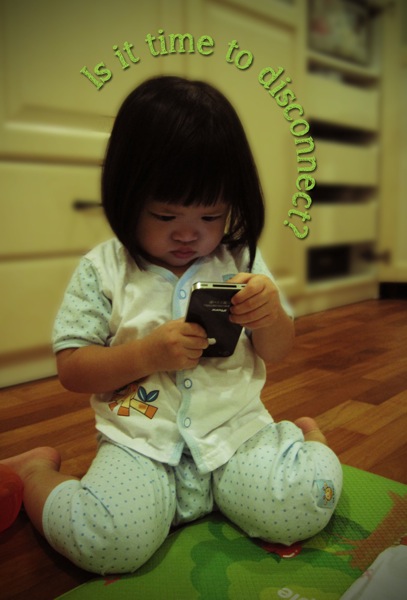
Time to Disconnect

Disconnect

If you've been reading this blog for a while, you'll know that I've been making some attempts to disconnect. To get off my iPhone and get some real-life interaction instead. 

Today, I'm blogging at the bottomsup blog on my attempts to get over my iPhone addiction, and sharing some tips on things I have found useful while on this journey. It hasn't been easy and I've slipped up many many times. This is still a work in progress for me - more of that over here!

Interestingly, by the time you read this post, I will be on my way on a short vacation with my husband (and his Mum and Sis), SANS KIDS! It's the first time ever that the both of us are taking a trip away from the children. In fact, this is the first time I'm even spending the night without both children. The only other time I spent the night away from Noey was when I was in the hospital after delivering Naomi. So this is a big deal. We had originally intended to bring Noey with us - his air ticket had even been bought - but circumstances are such that we will be leaving both children behind.

Yes, I am worried. There is a possibility that one or both children might wake up and cry for Mummy in the middle of the night, notwithstanding the fact that they are in the capable hands of my parents. However, I have also decided to take this as a gift from God. Some time to allow me to get away - to disconnect from my online life and my kids, and to connect again with my husband and with God. So yes, I am worried, but I am also excited.

This is me, signing off. I'll be seeing you back here in a bit.

Sunday, June 17, 2012

Disconnect, Disengage

We are just back from 4 days in Batam for our church's annual conference. It's only been 4 days, but it feels much longer than that because it's been the first time in the long while that I was almost completely disconnected from the internet for days at a stretch.

Why this happened certainly wasn't planned.

On the night before we left, I grabbed at my phone in the dark after putting Nomi to sleep, and... it fell to the floor. It's not like this hasn't happened before, so I wasn't too concerned. Except. This time when I picked it up, the screen was blue.

Yes, the blue screen of death also haunts iPhones, if you're not careful.

My heart sank. After some desperate attempts to restart it and more even more desperate googling, I realised that the LCD was wrecked. The phone seemed to be working fine, but because I couldn't see a thing on the screen, it was effectively useless. We were to report at the ferry terminal at 9.30am in the morning so there was no way I was going to be able to bring my phone down to the service centre on time before leaving for Batam. I reached for the old 3GS but because the 4S uses a micro-sim, I couldn't use it. On hindsight, I probably should have spent some time googling how to re-size a micro-sim to fit a full sized sim-card slot. I have since found some instructions on how do just that

But on Monday night, with packing still yet to be completed, I was resigned to not having a phone throughout my time away. Not that I was about to give up my internet habit quite so easily at that time though. I was informed that the hotel provided free wifi, so I lugged along my iPad and my Macbook, thinking that I could log on when I had some free time in the room.

It seems however, that God had other ideas.

While the hotel did provide free wifi, I found that it really only worked in the common areas. After I found myself standing at the door to my room and sticking my iPad out into the corridor to try to get a connection, I decided to take the hint. I put aside my devices and stopped trying to get online. The funny thing is that DD tells me he had no trouble getting online with the iPad while in the room, so I think that it was me that God just really didn't want online! 

Disconnecting and being virtually uncontactable took a bit of getting used to. It was more than just cutting back, which I consciously make an effort to do most days. I hated not being able to snap and post on Instagram on the go and I kept wondering if I was getting new e-mails and missing tweets. But thankfully, I got over it pretty quickly. By the time the conference ended, I pretty much didn't care any more that I had no phone. Instead, I found that I enjoyed the change of pace. 

So in a way which I didn't intend, I got a good break. I did more reading, talked to those around me, and spent more time just stoning. I probably needed it.

Now that I'm back, I'm wondering if I can engineer more situations where I put away the phone for an extended period. Because sometimes I think having that time to just stop and stare, rather than share and share is a good thing too.

IMG 3864

Wednesday, June 06, 2012

Macbook-ed

It was my birthday last Thursday on the last day of May.

I will leave the usual reflective birthday post for another day. (Or not, if I never get round to it.) This post is about my present. This year, I decided to go geek and asked D for a new laptop -- my first EVER Mac.


Hello, Macbook Pro!

This was the laptop that I nearly got the last time, but which I decided against because it was too expensive. That was before I got my iPhone. The phone was my first Apple product, and given that I love it so much that it is practically glued to my hand, when my laptop started acting up, I decided that this time, I was going to get the Mac. I was going to switch and never look back -- just the way all my fervent Mac-loving friends have told me. "Mac systems are intuitive, aren't they?" I told myself. "How hard can it be to switch?"

Well.

For this girl who has been using PCs and Windows all her life, it's been a painful few days, as I tear my hair out trying to figure out what to click, how to click and where in the world all my stuff is. To be fair, part of the pain stems from the usual difficulties which come with using a new machine and having to re-install programmes, shortcuts and re-input saved passwords and favourites. I somehow also thought iTunes connectivity with my iPhone would be more seamless. Just sync and everything will be transferred over, right? The answer, unfortunately, appears to be NO. (Unless I'm missing something. In which case PLEASE tell me.)

The good news is that every "how-to" that you want to ask about using a Mac appears to have been asked and answered. Alternating between Help and Google, I've managed to figure out how to install my printer, how to preview a link in Safari, how to open a new tab in Safari, how to resize photos in iPhoto, how to copy all my music from my phone into iTunes on my new notebook.

At this point, I'm still getting up the courage to copy my music over. I've also given up on Safari and downloaded Google Chrome. Yay. Now I still have to figure out how to customize the items in the dock before I end up with a bazillion items in it, change my preferences and figure out why there are lights under a whole bunch of items in my dock. And someone please tell me how to minimize all the windows to show desktop?

Every time I turn up mournfully at the door asking for help for something, the husband will -- after having a good chuckle at my grief -- ask me if I want to download Windows. I just give him a dirty look.

Ah well, at least my new notebook looks gorgeous! (Which is, also a big part of the user experience for me.)

So, blogging here will be slow for a bit until I figure this Mac thing out.

Friday, May 18, 2012

Disconnecting from the Connected World


My iPad and iPhone. They are both a boon and a bane.

I don't deny it -- I love my iDevices. I know that maternity this second time round was not as isolating an experience as it was the first time because I had adult conversation at my fingertips. Whatsapp, e-mails, twitter and facebook kept me in touch with my friends and in tune with what was going on outside our four walls. I could check in when I wanted and find conversation. I could read the news and friends' blogs. And yes, I could also online shop. What's there not to love, right?

But lately, I've been feeling like I've become a bit too addicted to my phone. On normal days, my iPhone rarely leaves my hand. I bring it round everywhere I go, from room to room, and I can always find something to do with it. It buzzes as SMSes, whatsapp messages come in, and I check my phone. Usually I'll stop what I'm doing to answer. I check e-mail, check facebook, check twitter, check instagram, and then I do it all over again. I check google reader and clear new posts. I snap some photos. And I'm always finding something to google. Sometimes my phone even, you know, rings! And I use it to have a conversation.

DD has commented more than once on my need to be fiddling with my phone, but I chose to ignore him.

But lately, my conscience has been troubled and I felt like I had to re-look at my phone usage and reduce it. This was probably triggered by a number of things:

(1) The fact that Naomi makes a beeline for my phone every time she sees it. Initially she would pounce on it and press it to her ear and say "Hi!", which I think is fairly acceptable behaviour. But lately what she wants is to make me activate the phone (or at least cause the screen to light up), and she would then flash me a big grin and walk around or laze around staring at it. I had an uncomfortable feeling that was what I looked like to her most of the time.

(2) A couple of weeks back, Noey asked me for a pen and some paper to write a note to his friend. I gave them to him and left him to it. DD later called me over to see what he wrote:
"I will masih you." 
(ie. I will message you.)

DD and I had a good laugh over it when we saw what he wrote (including the fact that he had clearly tried to spell "message" phonetically and used "h" for the name of the letter instead of its sound). But it also gave me pause. Did he write that because that's what he's heard me saying? Is that how he thinks you communicate with your friends and did he learn that from my example?

(3) My bible study has been leading me to consider temptations in my life and refocusing on God. On reflection, I felt that being distracted by my phone was one of the things I wanted to overcome.

And so, I decided about a week ago to cut down on the incessant checking. I disabled a whole bunch of notifications from my social networking apps and turned off most of the alerts, and breathed a sigh of relief. I stopped checking facebook, twitter and e-mail quite as often  (I still indulge in instagram a bit more), saving it for the moments when the children are asleep, or when I'm out and about and have a pocket of time. And no, that's not when I'm in the car at a stop light.

It's been somewhat easier than I thought. Maybe because I prayed for strength. It just took a conscious effort on my part on the first couple of days, and then I stopped missing it. I can't keep up with online chatter now till the end of the day, unless there's an opportune break. That also means I'm missing out on the latest news --  I completely forgot and missed out on nomination day drama for the Hougang by-election, for example -- but it's no big deal, is it? In return, I feel like I've had more "real" time with the kids, and I'm very happy about that.

It's only been a week, but I hope I can keep it up. I know I can't expect to phase out the use of social apps in my life. The truth is, I don't want to. All of it has enabled me to keep in touch with friends, both near and far, let my husband have a glimpse of what is going on at home while he's in the office, and helped me make new friends too. Google has also helped keep the kids fed on recipes and answered many of Noey's "why?" questions. Being online on my phone also helps me stay sane while I'm cooped up in the room waiting for Noey to fall asleep. (Though that said, I had so much fun telling silly stories with Noey tonight just before bedtime, I think I'll drop the screen time in favour of some of that next time.)

I guess what I'm saying is what everyone knows: moderation is the key. The problem is recognising and acknowledging that your phone usage is not moderate. Once you realise that, it's about finding a balance that works for everyone in your life. I know I don't want the image of me constantly on my phone to be my kids' memory of me.

Please, God, help me keep this up!

Thursday, November 17, 2011

Published!

About a week ago, this arrived in the mail:

My blog book! Volume 1.

I have been meaning to print out a hard copy of my blog for some time. Call it paranoia but it's always there at the back of my mind that one day Blogger might just disappear, taking with it all my posts. There was a time when I used to regularly PDF all my posts as backup, till I got lazy and stopped doing it.

I was mighty pleased when I came across Blog2Print. I had investigated several other different methods of getting my blog printed, but in the end, it seemed like this service was the most straight-forward and met most of my needs -- it auto-generated my blog, allowed me to print my blog with the pictures in the same layout as I had in my posts, include comments if I wanted, and choose the posts I wanted included.

In return for the convenience, there are certain drawbacks: I didn't want the auto-generated title on the front cover and wasn't pleased that I couldn't omit it, or choose the font/font size/colour for it. I couldn't choose the font of the text within the book either and the extra large fonts I used occasionally throughout my blog were rendered in the regular size. There were also some formatting problems which required me to tweak my html on my posts. Fortunately those could be sorted out. Also due to the number of posts I had, generating the book took a long time each time I needed to make some changes.

But it was done! I waited till they had a 15% discount promo (which they do fairly regularly) and then got my 2005 posts printed into a volume to test out the quality.

I must say I'm pretty pleased with it! Everything looks exactly like the online preview and the paper quality is nice, smooth and thick.


Separately, it's hard to believe but I've been writing for 6 years now, since 2005. What started as a whim has become a deep-seated hobby that I make time for, often writing and editing late into the night. Over the years, my writing style and what I've written about has changed. I used to be more open and free with what I said when I first started out, but I've come to realise that I just can't do that any more now. A while ago, I moved all my oldest posts -- where I used to blab freely -- off my blog onto a separate protected site. (Sorry about the broken links!) What remains mostly relates to the kids. I'm still trying to find the right balance and strike the right note. I love this space, so I don't think I'll be giving it up just yet.

In the meantime, I'm thinking of publishing yearly annuals as keepsakes. You know, just in case they disappear. If anyone knows a better publishing option, please let me know!

Friday, June 17, 2011

Re-Kindling an Interest in Books

For my recent birthday, I decided to go tech.

(This is in part due to the fact that DD refuses to buy me bags as presents. Tsk tsk.)

Unable to decide between a Kindle and an iPad2, DD told me to get both. Hee.

My Kindle just arrived and I'm loving it. It is a specialist reading device and I can't get over the fact that the screen really looks like paper! I don't like reading off backlit screens and am one of those people who needs to print documents for reading at the office. That was the one major difficulty I had with moving to e-books so I'm glad there is no such problem with the Kindle. Of course, the downside is that it cannot be read in the dark. Still, I'm loving how light it is and the fact that I can read with one hand and without needing to wedge the book open. Perfect for reading while nursing!

It is making me re-discover my old books and get excited about new ones.

One of the reasons I got the Kindle is also because I foresee the iPad being more a family gadget. With the Kindle however, I think I have more of a chance of making it wholly mine. Now if only I can get Noey to get his grubby paws off it and get with the programme. I think I'll have a better shot once the iPad arrives!

He loves the screensavers, the image quality of which I think is amazing.

Tuesday, March 10, 2009

-Blank-

My computer at work seems to have decided to play its part in ensuring that I waste less time in the office. On top of the fact that the Company has decided to block access to Facebook, ever since I've come back from maternity, it has refused to load my blog properly -- all I get when I try to click onto it is this page:


I'm not sure what's wrong with it! I've tried deleting the temporary internet files and cookies in the hope that it was just a bad copy that was saved, but sadly, nothing low-tech me has tried has worked. Anyone have any ideas?

And in the meantime, there's been tons to update! Ugh. More updates soon hopefully.

Sunday, February 22, 2009

Noah Meets Indy Sr

I think somebody inherited his father's love for lego. Or in this case, a love for little lego men.


No idea what he finds so funny! But he seems so entertained we can't help but laugh along with him. And DD can tick off another milestone on Noah's growth progress as he can clearly "pay attention to a very small object".

(On a sidenote, I'm terribly pleased that I've FINALLY managed to get this video uploaded. Our camcorder creates these .mts files and I was pulling my hair out wondering how to get them to play properly and convert them to a file format that I could upload. Eventually managed to find the Pixela Imagemixer programme that came with the camcorder that allowed me to convert the file. It also apparently allows me to edit the video but funnily enough, there's no user guide so I'm completely boggled...)

LinkWithin

Related Posts Plugin for WordPress, Blogger...